
Who hasn’t sent a test email to a real customer by accident? Or burned through the free tier of an email provider while testing the signup flow for the 50th time? If you test emails during local development, then you need something that accepts the mails, shows them to you, and delivers nothing. That’s why I built MailDotNull – a local mail catcher and mock email API for Resend, SendGrid, Mailjet, Mailgun, Postmark, Brevo, Amazon SES and plain SMTP.
In this blog post, I’ll show how to run MailDotNull with Docker, how to point the official SDKs at it, and how to use it for error testing and in integration tests. Let’s get started.
What is MailDotNull?
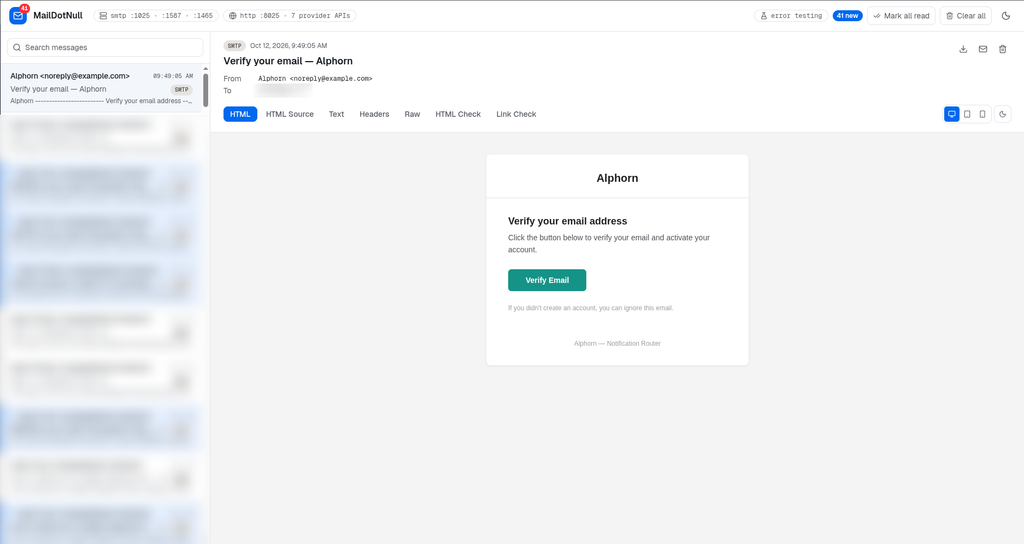
MailDotNull is an open source mail catcher like Mailpit – but it also mocks the HTTP send APIs of the popular email providers. You don’t change your code and you don’t write test doubles. You just change the base URL of the SDK, and every email lands in a live web inbox instead of a real mailbox.
Some facts at a glance:
- Mocked providers: Resend, SendGrid, Mailjet, Mailgun, Postmark, Brevo, Amazon SES v2 – and SMTP (plain, STARTTLS and SMTPS)
- Provider-faithful responses: each endpoint returns the real success shape (message ids, HTTP 202 + X-Message-Id, …), so the official SDKs treat the send as successful
- Any API key works, any SMTP credentials work
- In-memory only: no database, no files – a restart clears the inbox (that’s a feature!)
- Single Go binary with the web UI embedded, available as Docker image for amd64 and arm64
- License: MIT
Why not just use Mailpit?
Mailpit is great, and I used it for years. But it only speaks SMTP. Most of my projects don’t use SMTP anymore – they use the SDK of Resend or SendGrid, which calls an HTTP API. So for local development, I had two options: send real emails to the provider (with a test domain and a test key), or mock the SDK in my code. I didn’t like both.
With MailDotNull, the app uses exactly the same code path as in production – the same SDK, the same request, the same response handling. Only the URL is different. In my opinion, that’s the best way to test emails locally, because you also find bugs in the parts around the send (templates, error handling, retries).
Step 1: Start MailDotNull with Docker
The easiest way is Docker. Use the following command:
docker run -d --name maildotnull \
  -p 8025:8025 -p 1025:1025 -p 1587:1587 -p 1465:1465 \
  maildotnull/maildotnull
After that, the following ports are available:
- http://localhost:8025 – web UI and all provider APIs
- localhost:1025 – SMTP (plaintext, no STARTTLS, auth optional)
- localhost:1587 – SMTP with STARTTLS
- localhost:1465 – SMTPS (implicit TLS)
If you use Podman, then add -e HOSTNAME=0.0.0.0 for the 0.1.0 image – Podman sets HOSTNAME to the container hostname, which the server would otherwise use as bind address:
podman run -d --name maildotnull \
  -e HOSTNAME=0.0.0.0 \
  -p 8025:8025 -p 1025:1025 -p 1587:1587 -p 1465:1465 \
  docker.io/maildotnull/maildotnull
I personally prefer to add it to the docker-compose.yml of the project, so it starts together with the database:
services:
  # local mail catcher - nothing is delivered
  maildotnull:
    image: maildotnull/maildotnull:latest
    ports:
      - "8025:8025" # web ui + provider apis
      - "1025:1025" # smtp
Step 2: Send a test email
Let’s check if it works. The following request uses the Resend API format – the API key can be anything:
curl http://localhost:8025/emails \
  -H "Authorization: Bearer re_anything" \
  -H "Content-Type: application/json" \
  -d '{"from": "Test <[email protected]>", "to": ["[email protected]"], "subject": "Hello from MailDotNull", "text": "It works!"}'
Open http://localhost:8025 and the mail is already there. The inbox uses server-sent events, so you don’t have to refresh the page.
Step 3: Point your SDK at MailDotNull
Each provider is mocked at the exact path that its SDK calls, so switching is one config line. For Resend, it looks like this:
import { Resend } from "resend";

// in development, send everything to maildotnull instead of resend
const resend = process.env.NODE_ENV === "production"
  ? new Resend(process.env.RESEND_API_KEY)
  : new Resend("re_mock", { baseUrl: "http://localhost:8025" });

await resend.emails.send({
  from: "Armin <[email protected]>",
  to: ["[email protected]"],
  subject: "Welcome!",
  html: "<p>Thanks for signing up.</p>",
});
For the other providers, you have to set the following options:
- SendGrid: client.setDefaultRequest(“baseUrl”, “http://localhost:8025“)
- Mailjet: new Mailjet({ apiKey, apiSecret, config: { host: “localhost:8025” } })
- Mailgun: mailgun.client({ username: “api”, key: “mock”, url: “http://localhost:8025” })
- Postmark: new ServerClient(“mock”, { requestHost: “localhost:8025”, useHttps: false })
- Brevo: set the base path of the SDK to http://localhost:8025/v3
- Amazon SES v2: new SESv2Client({ endpoint: “http://localhost:8025“, credentials: { accessKeyId: “mock”, secretAccessKey: “mock” } })
If your app uses SMTP (e.g. with nodemailer), then use host localhost and port 1025:
import nodemailer from "nodemailer";

// port 1025 never advertises STARTTLS, so no tls config is needed
const transport = nodemailer.createTransport({
  host: "localhost",
  port: 1025,
});
Note: the certificate on port 1587 and 1465 is self-signed and regenerated on every start. If you want to test TLS, then you have to accept it in your client (e.g. tls: { rejectUnauthorized: false } in nodemailer). Attention! Only do this for MailDotNull, never for a real mail server!
Step 4: Check how the email looks on mobile and in dark mode
This is the part where I spent most of the time, and I really like the result. Every HTML mail renders in a sandboxed iframe, and you have the following tools:
- Device widths: desktop, tablet (768px) and mobile (375px)
- Dark mode simulation: how Gmail Android, Gmail iOS, Apple Mail, Outlook.com and Yahoo Mail transform your mail in dark mode
- HTML Check: flags HTML/CSS features that are known to break in mail clients
- Link Check: checks the HTTP status of every link in the mail
- Source, Text, Headers and Raw tabs – Raw shows the payload exactly as received
Note: the mail clients don’t publish their dark mode algorithms, so the simulation is an approximation. It’s a very good preview, but not pixel truth.
Step 5: Test error handling – rate limits, server errors, timeouts
What happens in your app if SendGrid returns a 429? Or if the SMTP server doesn’t answer? In my experience, this code path is never tested, because it’s hard to reproduce with a real provider. With MailDotNull, you can make any provider misbehave – via the flask button in the header of the web UI, or via the API:
# sendgrid returns 429, all other providers work normally
curl -X PUT http://localhost:8025/api/error-testing \
  -H "Content-Type: application/json" \
  -d '{"providers": {"sendgrid": "rate-limit"}}'
The following modes are available:
- HTTP providers: off, delay, rate-limit (429), server-error (500), timeout – for all providers at once or per provider
- SMTP: off, delay, timeout, reject-temporary (451), reject-permanent (550)
- SMTP auth: optional or required – when required, unauthenticated senders get “530 Authentication required”
- delaySeconds: how long the delay waits (1-300 seconds, default 10)
The error responses use the real error format of each provider, so the official SDKs throw their typed errors – exactly like in production. To reset everything, use the following command (or just restart the container):
curl -X PUT http://localhost:8025/api/error-testing \
  -H "Content-Type: application/json" \
  -d '{"http": "off", "providers": {"sendgrid": "inherit"}, "smtp": "off"}'
Use MailDotNull in integration tests and CI
The web UI uses a small API, and you can use it in your tests as well. So you can trigger e.g. a password reset in your app and then check if the mail was sent:
// clear the inbox before the test
await fetch("http://localhost:8025/api/messages", { method: "DELETE" });

// ... trigger the password reset in your app ...

// check that exactly one mail was sent to the user
const messages = await (await fetch("http://localhost:8025/api/messages")).json();
const mail = messages.find((m) => m.to.includes("[email protected]"));

expect(mail.subject).toBe("Reset your password");
The list contains a summary of each mail (id, source, from, to, subject, snippet, …). For the full mail incl. HTML body, use GET /api/messages/:id. In a CI pipeline, you start MailDotNull as a service container, and that’s it – no API keys, no test domain, no secrets in the pipeline.
Note: MailDotNull keeps the most recent 1000 messages in memory. For tests, I recommend to clear the inbox before each test, so the tests don’t depend on each other.
Is MailDotNull safe to use?
Nothing is delivered and nothing is persisted – that’s the whole idea. HTML bodies always render in a fully sandboxed iframe, so a caught mail can’t run scripts or touch the app.
But be careful: MailDotNull accepts any API key and any credentials. It’s a tool for local development and CI, so don’t expose it to the internet!
Further Information
MailDotNull on GitHub: https://github.com/maildotnull/maildotnull
MailDotNull on Docker Hub: https://hub.docker.com/r/maildotnull/maildotnull
Mailpit: https://mailpit.axllent.org/
Resend Node.js SDK: https://github.com/resend/resend-node
Nodemailer: https://nodemailer.com/

Comments are closed